PassivAi® free tool
The AI Humaniser
AI has given you a useful draft, but it sounds flat, generic or nothing like you. Paste it in and get natural British English that keeps your facts and meaning, with the robotic habits taken out.
- Humanise the wording, match your English and capture your writing habits
- Your text stays in your browser
- A rewritten version you can edit, copy or print
Free. No sign-up needed to see your rewrite.
Paste, rewrite, use
Make an AI-assisted draft sound like a person wrote it
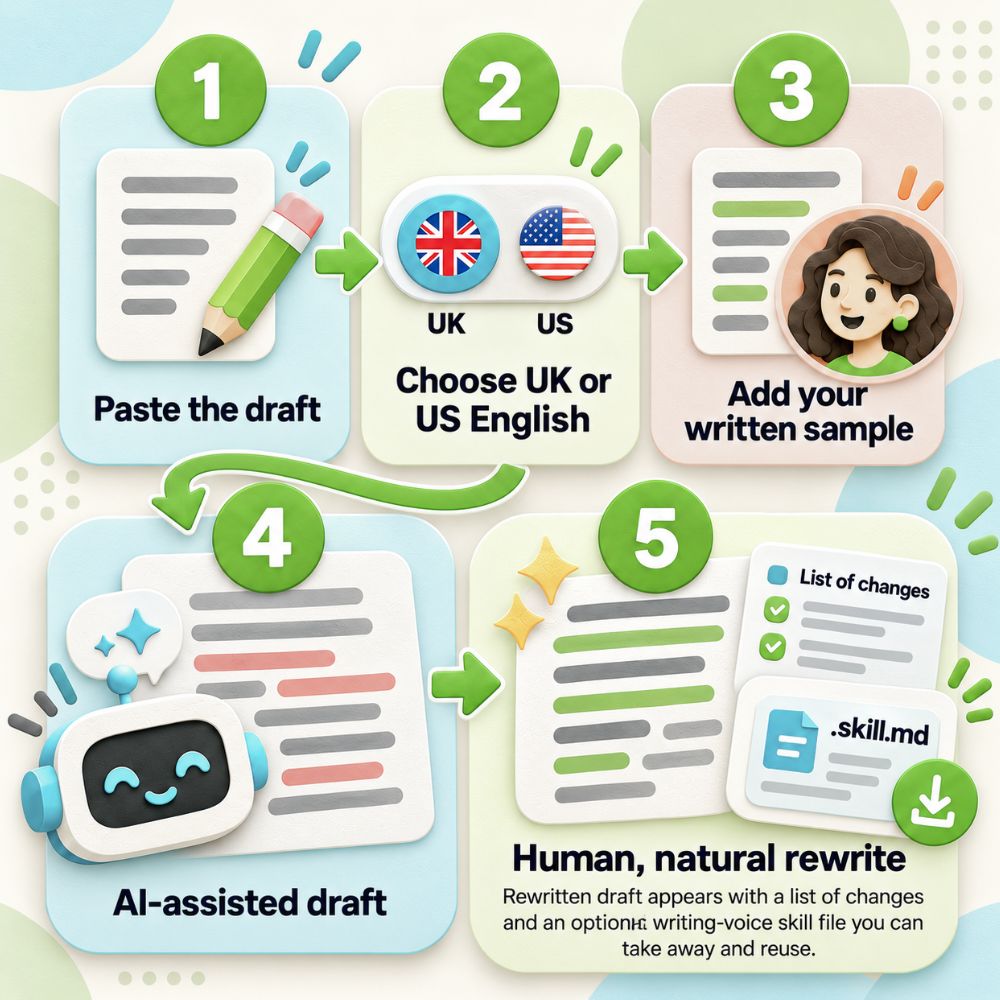
Paste a short section of writing. The editor removes machine habits, shortens padded phrases, applies British or American English and improves the rhythm. Add a genuine written sample of your own work if you also want a reusable writing profile.
Your rewritten draft appears below in seconds, with a list of changes and an optional writing-voice skill you can take away.
Start here
Paste your draft
The tool measures patterns it can actually see, such as sentence length, contractions, questions, paragraph shape and repeated wording. It will not invent personality traits that are not evidenced in your sample.
What the scan found
Keep the human part
- Keep facts, names and figures exactly right
- Add a detail only you would know where it helps
- Read the finished version aloud once
Your rewritten version
The browser editor removes familiar AI habits, applies your chosen English, shortens padded wording and improves rhythm without sending your text anywhere.
What changed
Read the result once before publishing. A browser editor can improve writing patterns, but only you can confirm that every fact and nuance still says what you meant.
Your writing profile
Take your writing profile with you
Download your personal writing skill
The file combines your observed writing habits with the PassivAi human-writing rules and your chosen English. Upload it to an AI tool later as a reusable writing brief.
If you did not add a written sample, the file will contain the universal human-writing rules and your language choice, but not a personal writing profile.

Want to take your writing further?
Move from general humanising to a complete message system
COREMAGIC™ PRO takes one structured intake and turns it into a reusable offer dashboard for your positioning, messaging and sales copy. It helps keep landing pages, emails, posts and other sales assets working from the same core message instead of starting from scratch every time.
See COREMAGIC™ PROHow it works
Three steps from stiff draft to a reusable writing voice
Paste the draft
Use one short section at a time so you can compare the result properly and keep every fact under control.
Choose your English and add your voice
Pick British or American English. Add a short written sample of your own work if you want the tool to measure the habits that already sound like you.
Use the rewrite and keep the skill
Check the edited version, then download a reusable .skill.md file containing your language choice, writing rules and any voice patterns found in your sample.
What the result tells you
Four checks that make AI-assisted writing sound more human
Your result shows what the scan found, a rewritten version you can edit and a reusable writing skill. If you add a genuine written sample, the tool also records measurable habits from your own writing. It is not a way to hide AI use or get past AI detectors.
Truth
Keeps the facts and main point. Strips empty openers such as “In today’s fast-paced world” and “It is important to note that”.
Specificity
Swaps hype and padding, such as “harness the power of” or “in order to”, for plain words. Flags unsupported claims like “most people”.
Language
Uses the English you choose, removes stiff wording and applies natural contractions where they fit. A supplied written sample adds measurable personal writing habits.
Rhythm
Splits sentences over 30 words, removes repeated sentences, replaces long dashes with ordinary punctuation and sets paragraph length for the format.
Common questions
Humanising AI text: common questions
How do I make AI-generated text sound more human?
Remove padded openers and hype words, use plain everyday language, vary sentence length and add details only you would know, such as a real example from your work. Read it aloud once. Anything you would not say to a customer face to face is worth changing.
What makes writing sound like AI wrote it?
Common signs are stock openers like “In today’s fast-paced world”, hype phrases like “harness the power of”, long dashes, frequent exclamation marks, sentences that run past 30 words and several sentences starting with the same word. Vague claims such as “most people” with nothing to back them up are another sign.
Is the AI Humaniser an AI detector bypass tool?
No. It is a writing editor. It removes familiar machine habits so the writing is easier to read and sounds more like a person. It is not designed to hide AI use or get past AI detection tools.
Will it change my facts or meaning?
It is designed to keep the facts and main point and change only the wording, punctuation and rhythm. Always read the rewritten version once before publishing, because only you can confirm that every detail still says what you meant.
Does Google penalise AI-written content?
Google says it rewards helpful, reliable content however it is produced. Content made mainly to manipulate search rankings goes against its spam policies. Editing an AI draft so it is accurate, specific and useful to readers fits Google’s people-first content guidance.
Can I choose British or American English?
Yes. Choose British English or American English before you run the edit. The tool applies spelling and selected everyday vocabulary rules for that version of English. Ambiguous words are left alone rather than changed blindly.
What kinds of writing can I use it on?
Use it on a short section of email, social, blog, landing-page or general copy. The free tool humanises writing across the board rather than creating a different channel-specific tone for each format.
Is my text sent anywhere?
No. Your draft stays in this browser and is not sent to PassivAi.
Is the AI Humaniser free and do I need to sign up?
Yes, it is free. You do not need to enter an email address to see your rewrite, and you can copy, edit or print it straight away.
Can I run the same draft through more than once?
Yes. Choose “Edit this version again” to run the rewritten text through the editor a second time, or edit it by hand in the box before copying.
Why does it remove long dashes and exclamation marks?
Both appear far more often in machine-written copy than in ordinary writing. Full stops and commas read more naturally, and the words themselves should carry the enthusiasm.
How does it learn anything about my voice?
Paste a genuine sample you wrote or approved. The browser measures observable habits such as sentence length, paragraph shape, contractions, questions, punctuation and repeated wording. It does not invent personality traits it cannot evidence. You can then download those observations as part of your personal writing skill.
Recommended next step
Your Writing is Boring - A Practical Guide for Expert Creators
This practical guide helps turn useful knowledge into writing that sounds natural, holds attention and gives the reader something specific to remember.
- Find stronger angles before writing the first line
- Replace flat explanations with concrete details and examples
- Edit AI-assisted drafts without sanding away your own voice
One-time purchase. Product details and current price are shown on the next page.

See how this is made
This free Humaniser is a browser-based writing editor, not a hidden AI model. It applies PassivAi human-writing rules drawn from the Safe Word system, the Humanise AI Writing method and practical writing-quality checks. It removes common AI-shaped wording, tidies rhythm and applies either British or American English.
If you add a written sample of your own work, the tool measures only patterns it can genuinely observe, such as sentence length, paragraph shape, contractions, questions, punctuation and repeated wording. It uses those observations to create your optional reusable writing-profile .skill.md file.
Your draft and written sample are processed locally in your browser. They are not sent to PassivAi, Make or an external AI service.